
Ruckus ICX - Firmware Recovery
Purpose
The purpose of this guide is to demonstrate how to recover the firmware and bootrom for a switch that has had either the wrong firmware applied or the firmware has become corrupted.
Pre-Requisites:
Please ensure you have the firmware downloaded from Ruckus
Please ensure you have installed a TFTP server running on your laptop or desktop which has access to the switch, for windows TFTPD32 is recommended and can be found > TFTPD32 Download
Firmware Recovery Process
Enter the Boot Loader
During the boot process press "b" repeatedly
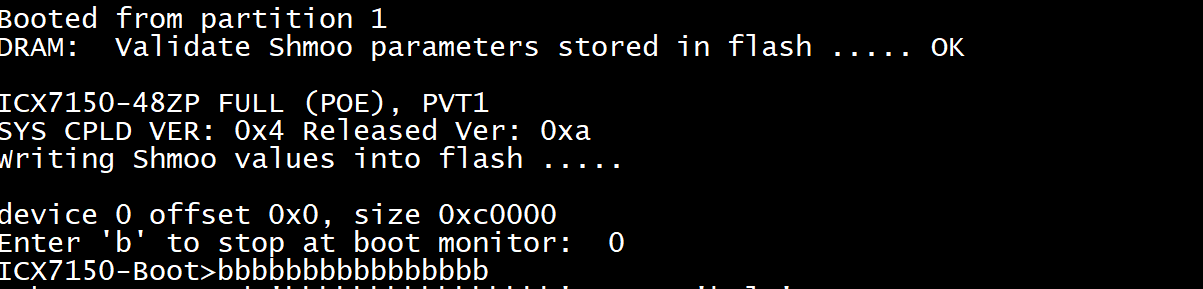
Change the Boot Settings
Replace [ ] with the information required
setenv serverip [IP Address]
setenv ipaddr [IP Address]
setenv netmask [Netmask x.x.x.x]
setenv gatewayip [Default gateway]
setenv uboot [Boot image.bin]
setenv image_name [Image Name.bin]
setenv serverip [IP Address] >>> IP address of TFTP server
setenv ipaddr [IP Address] ?>> IP address assigned to switch
setenv uboot [Boot image.bin] - Not needed if using UEFI Firmware
Display the Boot Settings
printenvThis will display the configured settings as set previously.
baudrate=9600
ipaddr=192.168.60.13
serverip=192.168.60.1
netmask=255.255.255.0
gatewayip=192.168.0.1
uboot=spz10107
image_name=SPS08041.bin
Uploading Bootrom
update_uboot Not needed if using UEFI Firmware
Uploading Firmware
update_primaryUpdates primary firmware bank
update_secondary Updates secondary firmware bank
Reboot the Switch
Once the switch has completed updating the bootrom and firmware it must be rebooted
powercycle